Convert JPG / JPEG to WebP — Free & Instant
Convert a single JPG (or JPEG) or bulk-convert an entire folder to WebP — free, private, instant. Smaller WebP files fix Largest Contentful Paint, pass Google PageSpeed Insights audits, and cut CDN bandwidth costs. No upload required.
Last updated: · By the Convertlo Editorial Team
What Is WebP?
WebP is a modern image format released by Google in 2010, built on the VP8 video codec. It produces files 25–35% smaller than JPEG at the same perceptual quality — and roughly 25% smaller than PNG for lossless images — while also supporting transparency and animation. WebP is natively supported by Chrome (since 2013), Firefox (2019), Safari (iOS 14+, 2020), and Edge, covering over 97% of global browser users as of 2026.
How the compression works: WebP lossy mode uses VP8 predictive coding — each pixel's value is predicted from surrounding blocks, then only the error (the difference between prediction and actual value) is encoded. This is the same principle as video compression, which is why WebP achieves video-level efficiency on still images. WebP lossless uses a palette-based prediction system that exploits spatial redundancy. Both approaches significantly outperform JPEG's DCT method, explaining the consistent 25–35% size advantage at matched quality.
| Question | Answer |
|---|---|
| What is WebP? | Modern image format by Google (2010), built on VP8 video codec. Supports lossy, lossless, transparency, and animation. |
| How much smaller than JPG? | 25–35% smaller at the same perceptual quality (Google study, 11,000 images) |
| Browser support (2026)? | 97%+ — Chrome (2013), Firefox (2019), Safari iOS 14+ (2020), Edge, Opera, Samsung Internet |
| Best quality setting? | 80–85 for most web; 82–88 for product photos; 68–75 for thumbnails; 100 for UI/screenshots |
| Does conversion reduce quality? | No visible loss at quality 75–85 — matches JPEG at quality 90–95. Artifacts only below quality 65. |
| Supports transparency? | Yes — unlike JPEG. Use lossless WebP (quality 100) for logos and PNGs with alpha channel. |
| Is WebP better for SEO? | Yes — smaller files reduce LCP and clear PageSpeed "Serve images in next-gen formats" audit. |
| WebP vs AVIF? | WebP: 97% support, fast encode. AVIF: 30–50% smaller than JPEG, slower encode, ~90% support. |
How to Convert JPG to WebP
The converter is embedded on this page — already set to JPG → WebP. No redirect needed.
Drag & drop your JPG or JPEG file, or click Browse. Supports files up to 50 MB.
Set WebP quality using the slider. 80% gives excellent quality at a fraction of the size.
Your WebP file downloads automatically — ready for web and SEO use.
JPG to WebP Converter — What It Looks Like
Why Convert JPG to WebP?
- 📉 25–35% smaller files — WebP produces much smaller files than JPG at equal visual quality
- 🚀 Fixes Largest Contentful Paint — image payload is the #1 LCP bottleneck; WebP's 25–35% size cut directly improves this Core Web Vitals score
- 📊 Passes Google PageSpeed Insights — PageSpeed flags JPGs as "serve images in next-gen formats"; converting to WebP removes this warning and boosts your score
- 📱 Lower CDN bandwidth costs — serve fewer bytes from your CDN, reducing costs and speeding up delivery to mobile users worldwide
- 🔒 100% private — files stay on your device, never uploaded to any server
- 🆓 Free forever — no watermarks, no limits, no credit card
- ⚡ Instant conversion — uses browser Canvas API for real-time processing
WebP Key Statistics
Factual benchmarks, sourced from Google and browser usage data.
Before & After: JPEG vs WebP Compression
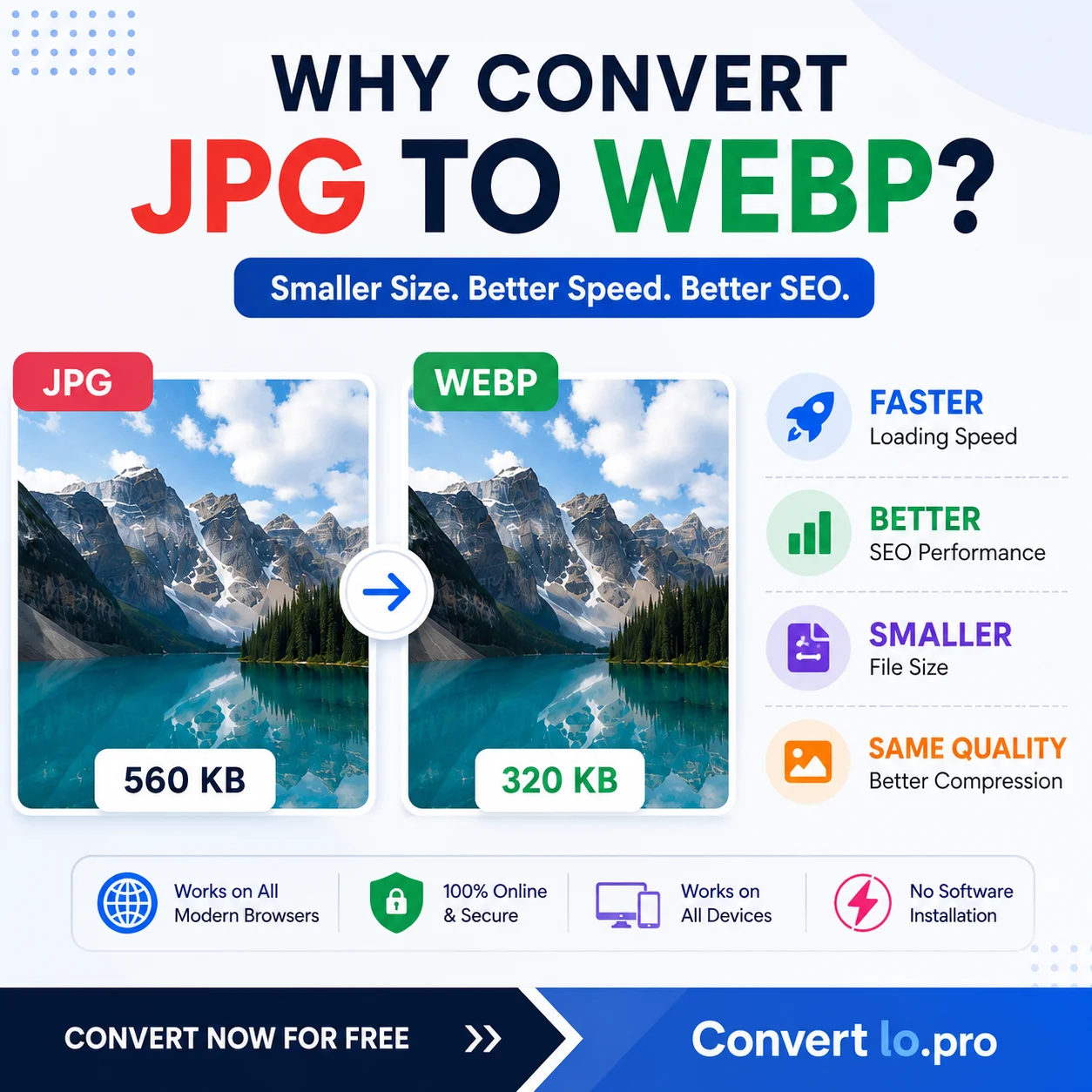
Same image, same visual quality. WebP delivers 57% smaller file size — a direct improvement to your LCP score and page load time.


Key Questions About WebP, Answered
Straight answers to the questions people actually ask about this conversion.
Is WebP better for SEO?
Yes — directly and measurably. WebP files are 25–35% smaller than JPEG at the same quality, cutting image payload and reducing page load time.
- Google PageSpeed Insights flags JPEG images under "Serve images in next-gen formats" — WebP clears it
- Clearing this audit typically adds 10–25 PageSpeed points on image-heavy pages
- Smaller images reduce Largest Contentful Paint (LCP) — Google's most heavily weighted Core Web Vitals signal
- LCP improvement often moves pages from "Needs Improvement" to "Good" — directly affecting rankings
Does converting JPG to WebP reduce image quality?
Not visibly at standard settings. At quality 80, WebP is perceptually identical to JPEG at quality 90–92, while producing files 28–35% smaller.
- WebP and JPEG quality scales are not equivalent: WebP 75 ≈ JPEG 90–92 in perceived sharpness
- Visible artifacts only appear below WebP quality 65 — far lower than any web use case requires
- For archival fidelity, use quality 90–95; for thumbnails, 68–75 is sufficient
- PNG files with text or sharp edges: use lossless WebP (quality 100) to prevent blurring
What is WebP browser support in 2026?
97%+ global coverage. All major modern browsers support WebP natively.
- Chrome: supported since 2013
- Firefox: supported since 2019
- Safari: iOS 14+ and macOS Big Sur+ (2020 onward)
- Edge, Opera, Samsung Internet: full support
- ~3% gap (IE 11, old Safari): cover with
<picture>+ JPEG fallback — zero broken images
How much smaller is WebP than JPG?
25–35% smaller at matched perceptual quality. A 400 KB JPEG at quality 85 typically becomes a 260–300 KB WebP.
- Smooth gradients, sky, large uniform areas: 30–40% savings (higher end)
- Complex textures — hair, fabric, foliage: 22–28% savings (lower end)
- Source: Google's WebP compression study across 11,000 images at matched visual quality
- Compress-then-convert stack: JPEG → compress → WebP can reach 80–87% total reduction
What is the best WebP quality setting?
Quality 80 is the standard starting point for most web images — visually identical to JPEG at quality 90–92, 28–35% smaller.
- 80–85: hero images, above-fold content, general web photos
- 82–88: e-commerce product photos where buyers zoom in closely
- 68–75: thumbnail grids displayed at 200–400 px — quality differences invisible at that size
- 100 (lossless): UI screenshots, logos, images with small text — lossy blurs sharp edges at any setting
Is JPG the same as JPG? Can I convert JPG to WebP?
Yes — JPEG and JPG are exactly the same format. JPEG (Joint Photographic Experts Group) is the full name of the standard; JPG is the shortened file extension that became common because early Windows systems limited file extensions to 3 characters. A .jpeg file and a .jpg file are byte-for-byte identical in format — just different naming conventions.
- This converter accepts both
.jpgand.jpegfiles identically - Cameras often save as
.jpeg— drop them in without renaming - Searching for "JPEG to WebP converter" and "JPG to WebP converter" should bring you to the same tool — they solve the same problem
- Some platforms (WordPress, Shopify) display "JPEG" in their file type lists — this is the same format as JPG
JPG to WebP Converter Features
100% Private
Files never leave your browser. Zero server uploads.
Instant
Conversion completes in seconds using Canvas API.
Free
No account, no fee, no watermarks. Ever.
Bulk JPG to WebP
Batch convert a full folder of JPGs to WebP at once — same quality, ZIP download.
Quality Control
Adjust WebP quality from 10% to 100%.
Mobile-Friendly
Works on any device — phone, tablet, desktop.
Bulk JPG to WebP Conversion
Need to convert a whole folder of JPG images to WebP? Enable batch mode in the converter above — no file count limit, everything processes in your browser, and you can download all converted WebP files as a single ZIP.
Toggle "Batch convert" in the options panel. The drop zone expands to accept multiple JPG files at once.
Drag and drop as many JPG or JPEG files as you need. Use "Add more files" to append images after the initial selection.
The quality slider applies to every file in the batch — one setting converts the entire folder at consistent WebP quality.
Download each WebP individually or grab them all in one ZIP. All bulk conversion happens 100% in your browser — nothing uploaded.
How to Use WebP on Your Website
After converting your JPGs, use these patterns to serve WebP with maximum performance — covering responsive images, lazy loading, CDN delivery, and browser fallbacks.
Serve WebP to Chrome and modern browsers, with a JPG fallback for the rare browser that doesn't support it:
<picture>
  <source srcset="img.webp"
          type="image/webp">
  <img src="img.jpg" alt="…">
</picture>
Pair WebP with srcset to serve the right file size to every screen — cuts CDN bandwidth and directly improves Largest Contentful Paint:
<img
  srcset="sm.webp 480w,
          md.webp 800w,
          lg.webp 1200w"
  sizes="(max-width:600px) 480px,
         800px"
  src="md.webp" alt="…">
Add loading="lazy" to defer off-screen images. Google PageSpeed Insights rewards this alongside WebP — together they're the two biggest image performance wins:
<img src="hero.webp"
     loading="lazy"
     width="800" height="600"
     alt="…">
AVIF compresses 30–50% better than JPG (vs WebP's 25–35%) but encodes much slower. Chrome supports both; Safari added AVIF in 16.4. WebP remains the safer choice for broad production use today — use AVIF for hero images only where encoding time doesn't matter.
WebP and Core Web Vitals: The Direct Connection
Google's Core Web Vitals are ranking signals. Images are the biggest lever — and WebP is the fastest way to move the needle without touching your code.
LCP measures how long the largest visible element takes to load — and that element is a hero image on over 75% of pages. A 600 KB hero JPG converted to WebP becomes roughly 390 KB at the same quality, cutting download time by ~35%. That often moves LCP from "Needs Improvement" into "Good" on a mobile connection without changing a single line of HTML.
CLS measures page jump as content loads. Images without explicit width and height attributes are the top CLS source. When you convert to WebP, it's the right moment to add missing dimensions. WebP's faster load also gives the browser less time to shift content around before the image appears.
INP measures how fast the page responds to clicks and taps. Heavy images that take long to decode can indirectly hurt INP by blocking the main thread. Smaller WebP files decode faster on the GPU. The difference is subtle on fast connections, but real on mid-range Android devices — which make up the majority of mobile traffic in most markets.
On a typical 4G connection (~10 Mbps), a 400 KB image downloads in about 0.32 seconds. The WebP equivalent at 260 KB takes 0.21 seconds — saving 0.11 seconds on a single image. On 3G (~1.5 Mbps), that same conversion saves ~0.75 seconds on one hero image. Google PageSpeed Insights flags every JPG with "Serve images in next-gen formats" — clearing this single audit typically adds 15–25 points to your PageSpeed score.
JPG vs WebP vs PNG vs AVIF — Full Comparison
| Feature | JPEG / JPG | WebP Best for web | PNG | AVIF |
|---|---|---|---|---|
| File size vs JPEG | Baseline | 25–35% smaller | 2–5× larger (photos) | 30–50% smaller |
| Transparency (alpha) | ❌ No | ✅ Yes | ✅ Yes | ✅ Yes |
| Animation | ❌ No | ✅ Yes (64% smaller than GIF) | ❌ No | ✅ Yes |
| Lossless mode | ❌ No | ✅ Yes | ✅ Yes (only) | ✅ Yes |
| Chrome support since | 1998 | 2013 | 1995 | 2021 |
| Safari support since | All versions | iOS 14 / macOS Big Sur (2020) | All versions | 16.4+ (2023) |
| Global browser coverage | ~100% | 97%+ | ~100% | ~90% |
| Encoding speed | Fast | Fast | Fast | Slow (5–20× slower) |
| Google PageSpeed | ❌ Flagged ("next-gen formats") | ✅ Recommended | ⚠ Flagged for photos | ✅ Recommended |
| Best use case today | Broad compatibility | All web images | Logos, screenshots | Hero images (future) |
When Not to Use WebP
WebP is the right call for virtually every web image — but there are a few real situations where you should keep JPG or PNG.
Gmail, Outlook, Apple Mail, Yahoo Mail — nearly every email client ignores WebP and shows a broken image. This is a long-standing, industry-wide gap that has no fix. Always use JPG or PNG for any image that might be rendered inside an email client.
Pinterest, LinkedIn, and some Twitter/X crawlers don't reliably handle WebP URLs in og:image tags. Link preview thumbnails can appear broken. Best practice: keep og:image as JPG and use WebP only for on-page img tags — you get the full SEO benefit without the social sharing risk.
Converting to WebP strips EXIF metadata — GPS coordinates, camera settings, copyright info, date taken. For professional photography, photojournalism, or legal records where metadata matters, keep the original JPG. Use WebP only for the public-facing web copy.
WebP lossy compression can blur high-contrast edges and fine text at quality settings below 85 — the same limitation JPG has. For UI screenshots, documentation, or images where text sharpness matters, use lossless WebP (quality 100) or PNG to keep every pixel crisp.
Photoshop CC 23.2+ (Jan 2022) opens WebP natively. Older versions need Google's free WebPShop plugin. GIMP, Affinity Photo, and macOS Preview all support WebP without extras. Windows 11 Photos also handles it. If your team runs older tools, check compatibility before converting your working files.
Best WebP Quality Settings: The Short Answer
For most web images, use WebP quality 80–85. At quality 80, WebP is visually indistinguishable from a JPEG at quality 90–92, while producing files 28–35% smaller. That is the single most useful number to remember.
The longer answer depends on what the image does. A hero image that fills the screen is viewed differently than a 200 px thumbnail in a listing grid. A portfolio photograph is judged more critically than a background texture. The table below maps use cases to quality settings with the expected file size impact versus a JPEG at quality 85.
| Image type | WebP quality | Rationale | Size vs JPG Q85 |
|---|---|---|---|
| Hero / banner (above fold) | 80–85 | LCP element — quality is visible at full width | −28 to −35% |
| Product photo (main image) | 82–88 | Buyers inspect detail; artifacts hurt conversions | −22 to −32% |
| Product zoom / lightbox | 88–92 | Loaded on-demand, not at page load — quality first | −15 to −22% |
| Blog post inline image | 78–82 | Supports content, not the focus — minimize payload | −32 to −40% |
| Thumbnail / card grid | 70–78 | Displayed at 200–400 px; quality differences invisible | −42 to −52% |
| Photography portfolio | 83–90 | Fine detail is the reason visitors are on the page | −18 to −30% |
| Background / decorative | 65–75 | Not the focal point; often partially obscured by overlay | −48 to −58% |
| Screenshots with text / UI | 100 (lossless) | Lossy compression blurs high-contrast edges and text | −10 to −20% |
One thing most guides skip: WebP and JPEG quality scales are not the same. A WebP at quality 75 typically looks as sharp as a JPEG at quality 90–92. This means you can set a lower WebP quality number than you would with JPEG and still match — or exceed — the original's appearance. It is one of the reasons the file size savings are so large even at moderate quality settings.
The converter above defaults to quality 80 because that setting works well for the broadest range of real-world images. If you are unsure where to start, leave it at 80, convert, and compare in a new browser tab. Most people cannot spot the difference from the original JPEG at 90+ unless they are looking at fine textile, hair, or fur detail at 200% zoom.
WebP on WordPress, Shopify, Cloudflare and More
Once your images are converted, here is how the most popular platforms handle serving WebP with browser fallbacks automatically.
Imagify, ShortPixel, and EWWW Image Optimizer all auto-convert uploads to WebP on your server and serve them via the HTML picture element with a JPG fallback. Free tiers available. Imagify's "WebP Conversion" toggle is the simplest one-click setup — it works on any host, no server config required.
Shopify's CDN (Fastly + Imgix) has automatically served WebP to supported browsers since 2021. Every image you upload is already served as WebP to Chrome, Firefox, and Safari 14+ — no plugin needed. Use .webp in your image_url Liquid filters to force the format explicitly in templates.
Cloudflare Polish (Pro plan and above) automatically converts images to WebP for browsers sending Accept: image/webp. It also strips EXIF data and optimizes file sizes. Enable it under Dashboard → Speed → Optimization → Polish — no code changes on your site needed.
The Next.js <Image> component converts and serves WebP (or AVIF where supported) automatically. Set the quality prop (default 75), add width and height, and it handles format negotiation, lazy loading, and responsive srcset for you. No manual conversion needed.
Both platforms automatically serve WebP versions of uploaded images to supported browsers — handled at the CDN level. Upload your best-quality JPG and the platform handles format negotiation. No plugins, no configuration, no extra steps required.
Add a rewrite rule that serves .webp when the browser sends Accept: image/webp and a WebP file exists alongside the original. No HTML changes needed — browsers that support WebP get it automatically, others get the original.
WebP: Key Facts at a Glance
Google developed WebP from its VP8 video codec technology — the same algorithm used to compress YouTube video frames. That's why WebP achieves video-level compression efficiency on still images.
WebP supports animation, and an animated WebP file is typically 64% smaller than the equivalent GIF at the same frame count and quality. It's the modern, lightweight alternative for short looping animations on the web.
WebP has a full alpha channel (transparency), just like PNG. JPG has no transparency support at all — any transparent area is filled with white. This makes WebP the ideal format for logos, product cutouts, and UI icons on the web.
WebP was held back for years by Apple. Safari didn't support it until iOS 14 and macOS Big Sur in late 2020 — seven years after Chrome. That's the sole reason many developers avoided WebP until recently. Today, 97%+ of browsers support it.
Due to its more efficient compression, a WebP encoded at quality 75 typically matches the perceived sharpness of a JPG encoded at quality 90 — while being roughly half the file size. The default quality setting of 80 is the sweet spot for most web images.
Google has been re-encoding and serving all Image Search thumbnails as WebP since 2014, even when the original on your page is a JPG. If you've ever noticed Google Images loading faster than the original pages, WebP is part of the reason.
Unlike JPG (lossy only) or PNG (lossless only), WebP supports both modes. Lossy WebP is used for photos and produces the 25–35% size savings vs JPG. Lossless WebP is used for graphics and logos, producing files ~25% smaller than PNG with pixel-perfect quality.
On a typical 3G mobile connection (~8 Mbps), each megabyte of image weight adds roughly 1 second to page load time. Converting a page's hero image from a 600 KB JPG to a 380 KB WebP saves ~0.2 seconds — meaningful for Core Web Vitals and mobile bounce rates.
The Complete JPG to WebP Guide: Quality, Performance, and Everything In Between
Converting JPG images to WebP is one of the most impactful changes you can make to a website — it reduces image file sizes by 25–35%, directly improves Google's Core Web Vitals scores, and fixes the "Serve images in next-gen formats" warning that drags down PageSpeed scores on millions of sites. This guide covers everything: why the size advantage is real, how to choose the right quality setting, what happens to your files during conversion, and how to get WebP working correctly on every major platform.
Why JPG Is Holding Your Website Back
JPEG was standardized in 1992 and has been the dominant image format for web photos for over 30 years. That longevity has an obvious upside — virtually every device, browser, and piece of software on the planet can open a JPEG. The problem is that JPEG's compression algorithm was designed for 1990s hardware and network conditions, not for a world where Google measures your page load speed in milliseconds and uses it as a ranking signal.
The core issue is JPEG's DCT (Discrete Cosine Transform) compression method. It divides your image into 8×8 pixel blocks, transforms each block into frequency components, then discards the components human vision is least sensitive to. It works — but inefficiently by modern standards. WebP replaces this with VP8 predictive coding, the same algorithm that compresses YouTube video frames. Instead of encoding each block independently, VP8 predicts each pixel's value from its neighbors, then encodes only the prediction error. That's a fundamentally more efficient approach, which is why the same visual quality consistently fits in a smaller file.
The practical consequence: if your website is still serving JPEG images for photographs and hero images, Google PageSpeed Insights will flag every single one under the "Serve images in next-gen formats" audit. Clearing that audit typically adds 15–25 points to your PageSpeed score and often moves your Largest Contentful Paint (LCP) from the "Needs Improvement" band into the "Good" band — which directly affects your Google Search ranking.
Understanding the 25–35% Size Reduction
The 25–35% figure is not a marketing claim — it comes from Google's own WebP compression study, which compared WebP to JPEG across 11,000 images at matched perceptual quality. The range exists because the savings depend on image content: highly detailed photographs with lots of texture complexity see savings at the lower end (around 25%), while images with smooth gradients, sky backgrounds, or large areas of similar color see savings at the higher end (up to 40%).
In practice, the math looks like this: a 400 KB JPEG at quality 85 typically becomes a 260–300 KB WebP at equivalent visual quality. A 1 MB product photo becomes 650–750 KB. A 600 KB hero image becomes 390–440 KB. These are reductions in the actual bytes the browser has to download — and on a 4G mobile connection averaging 12 Mbps, every 100 KB of image savings translates to roughly 0.067 seconds of faster LCP.
Choosing the Right WebP Quality Setting
Quality 80 is the converter's default for a reason: it's the setting where WebP's perceptual quality is indistinguishable from a JPEG at quality 90–92 under normal viewing conditions, while producing files roughly 30% smaller. But "the default" is not always the right answer. Here's how to think about quality by use case:
| Use Case | Recommended Quality | Why | Typical File Size (vs JPG Q85) |
|---|---|---|---|
| Blog hero / above-fold image | 80–85 | LCP element — quality visible at full-width display | −28 to −35% |
| E-commerce product photo | 82–88 | Buyers inspect detail; blurring costs conversions | −22 to −32% |
| E-commerce zoom / lightbox | 88–92 | Loaded on demand, not at page load — prioritize quality | −15 to −22% |
| Thumbnail grid / listing page | 70–78 | Display at 200–400px; quality difference invisible at that size | −42 to −52% |
| Background / decorative image | 68–75 | Not the focus of the page; heavily viewed out-of-focus anyway | −48 to −58% |
| Photography portfolio (web) | 83–90 | Fine detail matters; quality is the reason visitors are there | −18 to −30% |
One practical note: WebP and JPEG quality scales are not equivalent. A WebP at quality 75 typically matches a JPEG at quality 90–92 in perceptual sharpness. This means you can set WebP quality lower than your JPEG quality and still match or exceed the original's appearance. The converter above defaults to 80, which is the sweet spot for the widest range of web use cases.
The PageSpeed Score Impact — What to Actually Expect
Google PageSpeed Insights scores are sensitive to image payload because images are both the largest assets on most pages and the assets that block Largest Contentful Paint (LCP). When you convert your page's images from JPEG to WebP, here's what typically happens to your PageSpeed score and Core Web Vitals:
The "Serve images in next-gen formats" audit disappears. This audit appears for every JPEG and PNG on the page that could instead be served as WebP or AVIF. Clearing it removes a consistent penalty that typically accounts for 10–20 PageSpeed points on image-heavy pages. For a blog post with 5 images or a product page with 8 images, clearing this audit alone often moves a score from the 60s into the mid-70s to 80s.
LCP improves by 150–500ms on mobile. Images are the LCP element on roughly 75% of web pages. Converting the hero image — the most common LCP element — from JPEG to WebP at quality 80 typically reduces it by 30–35%. On a 4G connection (12 Mbps average), a 600 KB hero JPEG takes 0.4s to download; the same image at 390 KB WebP takes 0.26s. That 0.14-second savings propagates directly into the LCP measurement.
LCP threshold crossings are the most valuable outcome. Google measures LCP on a three-band scale: Good (≤ 2.5s), Needs Improvement (2.5–4.0s), and Poor (> 4.0s). A page sitting at 2.8s LCP is just outside the "Good" band — the single most valuable ranking outcome. Converting its hero image to WebP often provides the 150–400ms improvement needed to cross into "Good," which has a direct and measurable impact on rankings.
What Happens to Your EXIF Metadata During Conversion
Browser-based JPG to WebP converters — including this one — convert images through the HTML5 Canvas API. The Canvas API treats images as raw pixel data: it reads your JPEG, decodes it into a pixel grid, then re-encodes those pixels as WebP. In this process, all EXIF metadata is stripped. That includes GPS coordinates, camera model, lens settings, ISO, shutter speed, shooting date and time, copyright information, and any custom metadata your camera or workflow added.
For web delivery, this is usually a feature rather than a bug. GPS metadata in photos taken at your home or a client's location is private information — stripping it before publishing is the correct default for privacy. Copyright metadata in EXIF is not legally enforceable once you've published the image anyway; proper copyright protection requires watermarking or a copyright registry.
The scenario where EXIF stripping is genuinely problematic: professional photography delivered to clients for commercial licensing, real estate listings where shooting location is part of the legal record, photojournalism with strict metadata requirements, or any workflow where downstream software reads EXIF to organize or process files. For these cases, use the command-line cwebp -metadata all input.jpg -o output.webp which preserves all EXIF data during conversion.
WebP for E-commerce: The Highest-ROI Application
For e-commerce sites, image optimization is not just an SEO concern — it's a direct revenue lever. Google's research shows that a 1-second improvement in mobile load time increases conversion rates by up to 27%. Image weight is the single largest contributor to slow e-commerce page loads, and WebP conversion is the fastest way to reduce it without changing a single word of copy or a single pixel of design.
A typical product listing page loads 8–12 images: a hero image, multiple product angles, size guides, lifestyle shots, and a few related product thumbnails. At an average JPEG size of 250 KB each, that's 2–3 MB of image payload per page load. Converting to WebP at quality 80–85 brings that down to 1.4–2.1 MB — and combining with compression first can reach 1.0–1.5 MB. The difference matters most on mobile, where the majority of e-commerce traffic now comes from.
The quality floor for product images is critical to get right. Buyers zoom in to check fabric texture, jewelry detail, and product finish. An image that looks fine at full page width can show visible compression artifacts when zoomed to 200–300% — and that directly translates to doubt, which translates to cart abandonment. Use quality 82–88 for the main product image. Use quality 88–92 for zoom/lightbox images (they're loaded on demand, not on initial page load, so file size matters less). Use quality 72–78 only for small thumbnails below 400px.
WebP vs AVIF: When to Go a Step Further
AVIF (AV1 Image File Format) is the format that comes after WebP in the compression evolution. Where WebP achieves 25–35% better compression than JPEG, AVIF achieves 30–50% better compression — a meaningful additional advantage. AVIF also supports HDR and wide color gamut, which WebP does not. The catch: AVIF has around 93% browser support (vs. WebP's 97%), and AVIF encoding is 5–15× slower than WebP encoding for equivalent quality.
The practical recommendation for 2026: use WebP as your baseline for all web images. For hero images and above-the-fold content where encoding time doesn't matter (you're pre-generating files, not encoding in real time), add AVIF as an additional source in the HTML <picture> element. Browsers that support AVIF will download the AVIF; browsers that support WebP will download the WebP; older browsers will fall back to JPEG. This three-format stack gives you the best of all worlds:
<picture><source srcset="hero.avif" type="image/avif"><source srcset="hero.webp" type="image/webp"><img src="hero.jpg" alt="..." fetchpriority="high"></picture>
Chrome serves the AVIF. Firefox, Safari 14+, and Edge serve the WebP. IE11 and legacy browsers serve the JPG. Zero broken images, maximum compression across all browsers.
For most sites with limited engineering resources, WebP alone is the right call. The additional AVIF conversion step requires extra tooling and storage. WebP's 97% browser support means you're capturing almost all the benefit with far less complexity.
Converting JPG to WebP at Scale: Beyond the Browser
The converter on this page handles everything in your browser — zero uploads, instant conversion, perfect for individual images or small batches. But for teams managing thousands of images, the same conversion needs to happen systematically. Here are the most common approaches at scale:
Cloudflare Polish (Pro plan, $20/month) is the lowest-effort option. Enable it in your Cloudflare dashboard and it automatically converts JPEG and PNG images to WebP at the network edge, for every request from a supporting browser. No code changes, no server configuration, no re-deployment. It reads the Accept: image/webp request header and serves WebP when supported, JPEG otherwise. This is the right choice for any site already on Cloudflare.
Cloudinary and Imgix are image CDNs that handle format conversion on the fly. Append f_auto,q_auto (Cloudinary) or auto=format&q=80 (Imgix) to your image URLs. They detect the browser's Accept header and serve WebP, AVIF, or JPEG automatically — and their quality-optimization algorithms often produce smaller files than a fixed quality setting. This is the right choice for high-volume media sites and marketplaces.
Sharp (Node.js) is the right choice for teams running their own server-side processing. It's the fastest programmatic image library available in JavaScript, processing a full-resolution image in under 500ms on a standard server. Add it to your upload webhook: when a user uploads an image, immediately generate WebP versions at each size you need, then serve those from your CDN. The sharp(input).webp({quality: 82}).toFile(output) syntax is straightforward to integrate into any Node.js pipeline.
cwebp CLI is Google's official command-line encoder, available free for all platforms. For bulk conversion of an existing folder: for f in *.jpg; do cwebp -q 82 "$f" -o "${f%.jpg}.webp"; done. The CLI also supports preserving EXIF metadata (-metadata all), specifying exact output file sizes (-size KB), and fine-grained quality controls that aren't available in browser-based tools.
The Bottom Line: Start With Your Highest-Traffic Pages
The ROI on converting JPG images to WebP is asymmetric: it takes 30–60 minutes of work for a small site, and the benefits last as long as the page exists. Every visitor who loads a faster page gets a better experience. Every month Google's crawler measures your LCP, your WebP images make that measurement better. Every dollar you pay your CDN for image bandwidth goes further because you're serving smaller files.
The practical starting point: open Google Search Console, go to Performance → Pages, and sort by impressions. Find your top 5 highest-traffic pages. Run each through PageSpeed Insights and look at the "Opportunities" section. If "Serve images in next-gen formats" appears, the images on that page are your first conversion targets. Use the converter above — drop your JPGs in, set quality to 80–85, and download the WebP versions. Then replace the image files in your CMS or codebase.
For the hero image specifically: add fetchpriority="high" to the <img> tag. This tells the browser to start downloading it as early as possible, even before the full HTML has been parsed. Combined with the smaller WebP file size, this single change often produces the most dramatic LCP improvement of any optimization on the page.
There is no meaningful downside to serving WebP for web images in 2026. Browser support is 97%+. The picture element with JPEG fallback protects the remaining 3%. Quality at 80–85 is indistinguishable from JPEG at 90–95 for normal screen viewing. The conversion is free and takes seconds. The performance improvement is permanent. If your images are still JPEG, use the converter at the top of this page to start changing that today.
Go Deeper: JPG to WEBP Resources
In-depth articles to help you understand the formats, pick the right settings, and get the best results.
Frequently Asked Questions
Is JPG to WebP conversion free?
How much smaller will my WebP file be compared to JPG?
Does converting JPG to WebP reduce image quality?
Can I convert JPEG to WebP as well?
Is WebP supported by all browsers?
Does my JPG file get uploaded to a server?
Can I bulk convert JPG to WebP?
Is there a free WebP compressor?
Why should I use WebP instead of JPG for my website?
Should I use WebP or AVIF?
How do I serve WebP with a fallback for older browsers?
Can I use WebP for email newsletters?
What is the difference between WebP lossy and lossless?
Does converting JPG to WebP strip EXIF metadata?
Can Photoshop open WebP files?
How do I convert WebP back to JPG?
How do I convert JPG to WebP on Windows 10 or 11?
cwebp -q 80 input.jpg -o output.webp. All three options are free.Does WebP support transparency?
Can WebP replace JPG on an entire website?
People Also Ask
Is WebP Better Than PNG?
For photos and complex images, yes. WebP lossy compression produces files 25–35% smaller than JPEG — and dramatically smaller than PNG — at equivalent visual quality. For images requiring transparency (logos, icons), WebP lossless is still around 25% smaller than PNG. The exception: PNG remains preferable for pixel-perfect graphics, screenshots containing text, and images requiring truly lossless archival quality. For all standard web use — product photos, hero images, blog illustrations — WebP outperforms both PNG and JPG in file size and page load speed.
Does WebP Improve SEO?
Yes, directly. Google uses page speed as a ranking signal, and image payload is the largest contributor to slow load times. Switching from JPG to WebP reduces image size by 25–35%, improving Largest Contentful Paint (LCP) — the Core Web Vitals metric Google weights most heavily in Search rankings. Google PageSpeed Insights explicitly flags JPGs with "Serve images in next-gen formats" and recommends WebP as the fix. Sites that convert their images to WebP commonly see PageSpeed scores jump from the 60s into the 90s, which correlates with improved rankings and lower bounce rates.
Why Is WebP Smaller Than JPG?
WebP uses a fundamentally more advanced compression algorithm. For lossy images it's based on VP8 video frame encoding, which predicts each pixel's value from surrounding blocks rather than storing values independently — the same principle that makes video compression so efficient. For lossless images it uses a palette-based prediction system that exploits spatial redundancy. The result: WebP achieves the same perceived quality as JPEG at 25–35% lower file size. This comes purely from the algorithm — no quality reduction is required to get smaller files.
Can iPhone Open WebP Files?
Yes. Safari on iOS 14 and later (released 2020) fully supports displaying WebP images, and Chrome for iOS does too. Any iPhone running iOS 14+ can open and view WebP files in the browser with no conversion needed. The iOS Photos app, however, does not natively support WebP — to save a WebP to your Camera Roll you'd need to convert it to JPG first. For sharing images on social media or via web links, any modern iPhone will display WebP correctly in both Safari and Chrome.
Is WebP Good for Pinterest?
Partially. Pinterest displays WebP images correctly in the app and on the web, but there's one caveat: Pinterest uses your page's og:image meta tag for pin thumbnails, and some Pinterest crawlers may not reliably handle WebP og:image URLs. Best practice: set your og:image to a JPEG for maximum crawler compatibility, and use WebP for all on-page <img> tags. This gives you the full PageSpeed and Core Web Vitals benefits of WebP while ensuring Pinterest pins always render with a reliable thumbnail.