Mono vs Stereo Audio: When to Use Each and How to Convert
Use mono for speech, voice AI, telephony, podcasts, and anything where spatial width is irrelevant — it halves your file size with no audible penalty. Use stereo for music, film sound design, and any content with meaningful spatial information. You can convert stereo MP3 to mono WAV (at any sample rate from 8 kHz to 192 kHz) at convertlo.pro/mp3-to-wav.html — no upload needed.
The choice between mono and stereo is one of the most misunderstood decisions in audio production. Many people default to stereo because "more channels = better quality" — but that's a misreading of how channels work. The right choice depends entirely on what the audio contains and what will consume it.
Quick answer: The difference between mono and stereo is the number of channels — mono carries one signal that every speaker plays identically, stereo carries separate left and right signals. Neither is higher quality than the other; they suit different material. Use mono for voice: podcasts, interviews, phone calls, and anything going into speech recognition. Use stereo for music, film and games, where left–right placement is part of the content. On file size, mono halves an uncompressed WAV, but saves nothing in an MP3 unless you lower the bitrate too.
Mono vs Stereo at a Glance
| Feature | Mono | Stereo |
|---|---|---|
| Audio channels | 1 | 2 |
| Left/right separation | No | Yes |
| Spatial positioning | No | Yes |
| Speech and narration | Excellent | Usually unnecessary |
| Music | Limited | Usually preferred |
| Voice recording | Usually suitable | Sometimes useful |
| Game sound effects | Often suitable | Depends on the asset |
| File size — uncompressed (WAV) | Half | Double |
| File size — MP3 at a fixed bitrate | Same | Same |
| Phase cancellation risk | None | Possible when downmixed |
| Best for | Speech, calls, narration | Music, ambience, spatial sound |
Two rows there tend to surprise people, and both are covered in detail below: a mono MP3 is not smaller than a stereo one at the same fixed bitrate, and the phase problems people associate with mono are really a property of the stereo mix being folded down.
What Is Mono Audio?
One Stream, Plays Identically Through Every Speaker
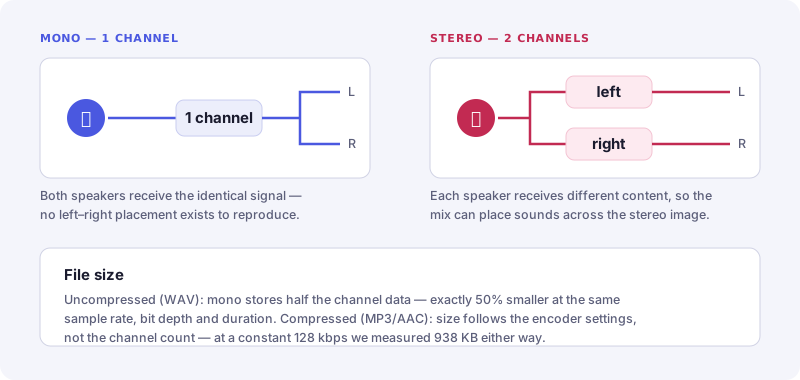
Mono (monaural) audio is a single channel of audio data. When played through multiple speakers — left, right, center — all speakers receive the exact same signal. There is no spatial width, no stereo field, no left/right positioning of sound sources.
- Channels: 1
- File size vs stereo: Exactly 50% smaller (half the data)
- Spatial image: None — all sound comes from the center
- Best for: Speech, voice AI, telephony, podcasts, radio narration, broadcast
- Sample rates: 8 kHz (telephony), 16 kHz (voice AI), 44.1 kHz (music)
Mono is not "low quality" — it's a channel configuration, not a quality level. A mono file at 44.1 kHz / 24-bit has the same frequency response and dynamic range as a stereo file at the same settings. The only difference is spatial width, which for speech and voice content is irrelevant.
What Is Stereo Audio?
Left and Right Channels — Separate but Related
Stereo audio uses two channels (L and R) that can carry different audio content. The difference between L and R creates a sense of width and spatial positioning — instruments can be placed across the stereo field from hard left to hard right, with reverb and room acoustics adding depth.
- Channels: 2 (Left + Right)
- File size vs mono: Exactly 2× larger
- Spatial image: Full stereo width — instruments can be panned across the field
- Best for: Music, film audio, game audio, spatial sound design
- Sample rates: 44.1 kHz (music), 48 kHz (video/film), 96 kHz (hi-res)
True stereo means the left and right channels contain genuinely different audio — a guitar panned left, a keyboard panned right, reverb tails that differ between channels. Mid-side stereo, binaural recording, and M/S processing all exploit this channel difference to create immersive spatial images.
Mono vs Stereo File Size: WAV Halves, MP3 Does Not
"Mono is half the size" is only true for uncompressed audio. In a WAV file every sample of every channel is written out literally, so dropping from two channels to one removes exactly half the bytes. In a compressed file the encoder settings decide the size. At a constant bitrate a 192 kbps MP3 is 192 kbps whether it carries one channel or two, so dropping to mono changes nothing on its own. With variable-bitrate encoding, or with a codec like Opus that allocates bits per channel, a mono file can come out smaller — how much is up to the encoder.
Uncompressed (WAV, AIFF, PCM) — mono is exactly 50% smaller:
| Format | Duration | Sample Rate | Bit Depth | Mono Size | Stereo Size |
|---|---|---|---|---|---|
| Voice AI / Whisper | 1 min | 16 kHz | 16-bit | 1.9 MB | 3.8 MB |
| Telephony / IVR | 1 min | 8 kHz | 16-bit | 960 KB | 1.9 MB |
| Podcast / Speech | 60 min | 44.1 kHz | 16-bit | ~300 MB | ~600 MB |
| Music (CD) | 4 min | 44.1 kHz | 16-bit | ~20 MB | ~40 MB |
| Studio (Hi-Res) | 4 min | 96 kHz | 24-bit | ~66 MB | ~132 MB |
| Archival | 4 min | 192 kHz | 24-bit | ~132 MB | ~264 MB |
Formula: size (bytes) = sample_rate × (bit_depth / 8) × channels × duration_seconds
For voice content at 16 kHz mono, a 1-hour podcast recording is approximately 115 MB. The same recording as 44.1 kHz stereo would be approximately 600 MB — 5× larger with no audible improvement for speech.
MP3: the same bitrate costs the same bytes, mono or stereo
We encoded one 60-second source twice at each constant bitrate — once as stereo, once downmixed to mono — with the LAME encoder, and measured the output:
| MP3 bitrate | Stereo | Mono | Saved by going mono |
|---|---|---|---|
| 64 kbps | 469 KB | 469 KB | 0.1% |
| 96 kbps | 704 KB | 703 KB | 0.0% |
| 128 kbps | 938 KB | 938 KB | 0.0% |
| 192 kbps | 1,407 KB | 1,407 KB | 0.0% |
| 320 kbps | 2,345 KB | 2,345 KB | 0.0% |
Nothing is saved, because nothing was asked to change. The mono file is not smaller — it is the same size at higher quality per channel, since the whole bitrate now serves one channel instead of two.
That is exactly why the saving is available: mono needs roughly half the bitrate to sound equivalent, so drop the bitrate along with the channel and the file halves.
| Stereo source | Mono at half the bitrate | Result |
|---|---|---|
| 128 kbps — 313 KB | 64 kbps — 157 KB | 50% smaller |
| 192 kbps — 470 KB | 96 kbps — 235 KB | 50% smaller |
| 256 kbps — 626 KB | 128 kbps — 313 KB | 50% smaller |
The practical rule: converting a stereo MP3 to mono at the same constant bitrate saves you nothing. Set the bitrate down at the same time and you get the file you were hoping for; in a WAV the channel change alone is enough. Under VBR, or with Opus, the encoder may hand back a smaller mono file on its own — but not by an amount you can predict from the channel count, which is why it is worth setting the bitrate explicitly rather than assuming.
How Stereo-to-Mono Downmixing Works
When you convert a stereo file to mono, you cannot simply discard one channel — that would lose half the audio content. Instead, you mix down both channels into one using a downmix algorithm.
The Standard Downmix Formula
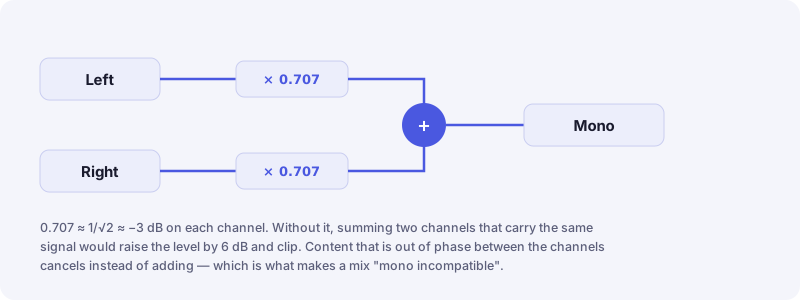
The ITU-R BS.775 standard for stereo-to-mono downmixing is:
where 0.707 ≈ 1/√2 ≈ −3 dB
The −3 dB reduction on each channel prevents the summed signal from exceeding 0 dBFS (full scale). If both channels carry the same signal (as in dual-mono), summing at full level would increase amplitude by 6 dB — well beyond digital ceiling and causing clipping.
Why −3 dB and Not −6 dB?
This is a common source of confusion. The choice depends on what you're summing:
- Correlated signals (same content in L+R): Sum amplitude increases by 6 dB. Use −6 dB per channel to normalize.
- Uncorrelated signals (different content in L+R): Sum amplitude increases by ~3 dB (RMS). Use −3 dB per channel to maintain perceived loudness.
The ITU-R standard uses −3 dB because it's optimal for mixed-content material (music with both correlated and decorrelated content). Some professional tools let you choose between 0 dB (direct sum, risk of clipping), −3 dB (ITU-R standard), or −6 dB (headroom safe).
Web Audio API Automatic Downmix
Convertlo's converter uses the Web Audio API's OfflineAudioContext. When you select Mono output, the context is created with 1 output channel: new OfflineAudioContext(1, length, sampleRate). When a stereo source connects to this mono context, the Web Audio specification mandates ITU-R standard channel mixing — automatic −3 dB downmix. No manual algorithm needed.
Phase Cancellation: The Mono Compatibility Risk
The biggest risk when downmixing to mono is phase cancellation. If the left and right channels contain the same audio but with opposite polarity (common with certain stereo widening effects or mid-side encoding), summing them cancels out the signal entirely — you get silence.
Mono or Stereo: Which Is Better?
Neither is higher quality. Stereo is not an upgrade to mono — it is a different container for a different kind of material, and using it for a single voice adds bytes without adding information. The useful question is not which is better but which matches the source, so here is where each one belongs:
Speech Recognition APIs
Google Speech-to-Text, OpenAI Whisper, AWS Transcribe, Azure Speech — all officially recommend or require mono. Stereo doubles data with zero accuracy benefit.
Mono · 16 kHz · 16-bitIVR / Call Center / VoIP
Phone networks sample at 8 kHz. Any higher sample rate is discarded. PCMU (G.711) and PCMA codecs are mono by definition. Always use 8 kHz mono for telephony.
Mono · 8 kHz · 16-bitVoice-Only Podcasts
Speech has no stereo information worth preserving. Mono podcasts are smaller, stream faster, and sound identical on earbuds. Spotify and Apple Podcasts accept mono.
Mono · 44.1 kHz · 16-bitMusic Production
Stereo instruments, panning, reverb width, and spatial imaging all require two channels. Music released in mono loses the stereo field entirely. Always use stereo for music.
Stereo · 44.1 kHz · 24-bitVideo Production
Dialogue tracks in film are often mono (each character mic is mono). The full mix is stereo or surround. For video work, deliver dialogue at 48 kHz mono; full mix at 48 kHz stereo.
Stereo · 48 kHz · 24-bitGame Sound Effects
Individual sound effects (footsteps, UI sounds, impacts) are stored as mono — the game engine positions them in 3D space. Only ambience and music stems are stored as stereo.
Mono · 44.1 kHz · 16-bitAM Radio / Legacy Broadcast
AM radio is mono. FM radio transmits stereo but most listeners receive it as mono in cars. Broadcast content should pass the mono compatibility check before air.
Mono · 32 kHz · 16-bitHistorical Audio Archiving
Pre-1958 recordings are inherently mono (stereo wasn't widely available until 1958). Archive historical mono recordings as high-resolution mono — not stereo — to save space without conversion artifacts.
Mono · 96 kHz · 24-bitVoice AI and Speech Recognition: When Should Audio Be Mono?
"Speech recognition requires mono" is the version of this you will read most often, and it is close enough to be useful but not accurate enough to build a pipeline on. Mono is the safe default. It is not a universal requirement, and at least one major provider treats multi-channel audio as a feature rather than a problem.
| Service | Recommended approach | Why |
|---|---|---|
| Google Cloud Speech-to-Text | Check the channel configuration | Supports multi-channel recognition, and can transcribe each channel separately — useful when two speakers were recorded to two channels |
| Azure AI Speech | Mono commonly used | Behaviour is API-specific; the streaming paths are the strictest |
| Whisper-based workflows | Mono is a safe preprocessing choice | The pipeline resamples and downmixes anyway, so sending mono simply removes a step |
| Telephony (G.711, VoIP) | Mono | Telephone audio is single-channel by design, at 8 kHz |
Where a second channel carries a second speaker — a two-person interview recorded to two mics, or an agent-and-caller recording — it is worth checking whether your provider can transcribe the channels separately before you downmix. Once you mix to mono that separation is gone, and no amount of processing brings it back. Where both channels carry the same voice, which is the usual case, mono removes work rather than information.
You can do this instantly at Convertlo's MP3 to WAV converter — select 16 kHz sample rate and Mono channel, no upload required.
Podcasts and Voice Content: Mono Wins
The podcast industry has largely settled on mono for voice-only content, and for good reason:
- File size: A 60-minute mono podcast at 44.1 kHz / 16-bit ≈ 300 MB raw WAV (before MP3 encoding). Stereo would be 600 MB — identical listening experience, double the storage and bandwidth.
- Smart speakers: Amazon Echo, Google Home, and HomePod all play audio from a single speaker driver — mono regardless of what you send.
- Earbuds: When one earbud falls out, mono ensures the listener hears everything. Stereo content on one earbud loses any panned material.
- Car audio: Many car stereo systems play podcast apps in mono mode, especially through Bluetooth.
Music Production: Stereo for the Mix, Mono for Stems
Music production has nuanced rules about mono vs stereo at different stages:
Recording Stage
Individual instrument microphones record mono by default (one mic = one channel). A stereo overhead pair creates a stereo bus. Electric guitar DI, bass DI, and most hardware synthesizers are mono. Recording mono instruments into mono tracks gives you precise panning control in the mix.
Mixing Stage
Individual tracks are often mono, but the mix bus is stereo. Reverb, delay, chorus, and stereo widening effects take mono inputs and output stereo. The goal is building a stereo field from mono building blocks — precise panning, subtle stereo widening, and carefully crafted reverb tails create the spatial image.
Mastering and Delivery
Final masters for commercial music are stereo. Check mono compatibility before delivery — sum to mono and verify nothing disappears. Streaming platforms (Spotify, Apple Music) stream stereo to headphones but mono-compatible content performs better on smart speakers and club systems.
| Production Stage | Format | Reason |
|---|---|---|
| Instrument recording | Mono | Single mic source; panning applied in mix |
| Stereo overhead / room mics | Stereo | Captures spatial information of the room |
| Mix bus | Stereo | Final spatial image assembled |
| Broadcast delivery | Stereo (mono-compatible) | Smart speakers often play in mono |
| Game audio SFX | Mono | Engine handles 3D positioning; mono assets are smaller |
Practical Conversion Guide
Here are the most common conversion scenarios and the exact settings to use:
| Goal | Sample Rate | Bit Depth | Channels | Why |
|---|---|---|---|---|
| Voice AI / Whisper input | 16 kHz | 16-bit | Mono | Official Whisper recommendation; smallest file for high accuracy |
| Telephony / IVR | 8 kHz | 16-bit | Mono | Phone network sample rate; any higher is discarded |
| Podcast delivery | 44.1 kHz | 16-bit | Mono | Voice content; half file size, identical quality for speech |
| Video editing (DAW) | 48 kHz | 24-bit | Stereo | Broadcast standard; stereo for full mix |
| Music production import | 44.1 kHz | 24-bit | Stereo | CD standard; 24-bit for processing headroom |
| Studio archival | 96 kHz | 24-bit | Stereo | Maximum fidelity; future-proof format |
Convert MP3 to Mono WAV — Any Sample Rate
Choose mono output at any of 10 sample rates (8 kHz to 192 kHz) and 3 bit depths. No upload, 100% private, works in any modern browser.
Key Takeaways
- Mono carries one audio channel; stereo carries separate left and right channels.
- Neither is higher quality — they suit different material.
- Mono is usually appropriate for speech, calls, narration and most single-mic voice recordings.
- Stereo is preferable when spatial information is part of the content: music, ambience, games, film.
- Uncompressed stereo PCM requires twice the channel data of mono at identical sample rate, bit depth and duration.
- An MP3 at a fixed bitrate is the same size in mono or stereo — we measured 938 KB either way at 128 kbps. Lower the bitrate along with the channel count to actually shrink the file.
- Stereo-to-mono conversion can cause phase cancellation where the two channels carry out-of-phase content.
- Speech-recognition channel requirements vary by service; Google Cloud Speech-to-Text supports multi-channel recognition, so mono is a safe default rather than a universal rule.
- Converting mono to stereo does not create genuine stereo information — it duplicates one channel into two.
Where These Claims Come From
Most of what is written about mono and stereo repeats other articles. These are the primary sources behind the specific claims on this page, so you can check them rather than take our word for it.
- W3C — Web Audio API specification
Defines the up-mixing and down-mixing rules a browser applies when a stereo source meets a mono destination. This is the behaviour our own converter relies on. - ITU-R BS.775 — Multichannel stereophonic sound system
The recommendation behind the −3 dB (0.707) coefficient applied to each channel before summing. - Google Cloud — Transcribing audio with multiple channels
Why "speech recognition requires mono" is too strong: this API accepts multi-channel audio and can transcribe each channel separately. - Microsoft — Azure AI Speech documentation
Channel expectations differ between the batch and streaming paths, so the requirement is API-specific rather than universal. - OpenAI — Whisper
The reference implementation resamples to 16 kHz and downmixes before inference, which is why supplying mono removes a step rather than changing the result. - RFC 6716 — Definition of the Opus Audio Codec
Opus allocates bits across channels, which is why a mono Opus file can be smaller where a constant-bitrate MP3 is not. - LAME MP3 encoder
The encoder used for the file-size measurements in this article.
File sizes quoted on this page were measured by encoding a single 60-second source twice at each setting — once as stereo, once downmixed to mono — rather than calculated from a formula.
Frequently Asked Questions
What is the difference between mono and stereo audio?
Is mono better than stereo?
Should I use mono or stereo for podcasts?
Is mono better for speech recognition?
What is stereo to mono downmixing?
Does converting stereo to mono lose quality?
Why does stereo disappear when converted to mono?
Is mono half the size of stereo?
sample_rate × (bit_depth / 8) × channels × duration — halving the channels halves the bytes. A 4-minute stereo WAV at 44.1 kHz / 16-bit is about 40 MB; as mono it is about 20 MB. In an MP3, AAC or Opus file the bitrate sets the size, not the channel count: we measured a 60-second clip at 128 kbps as both stereo and mono and got 938 KB either way. To actually shrink a compressed file, halve the bitrate when you go mono — 192 kbps stereo (470 KB) becomes 96 kbps mono (235 KB).